
LAB 01
Camera Calibration Explained: An Interactive OpenCV Lab
Move 13 sliders and watch a virtual pinhole camera update in real time: position, orientation, focal length, optical center and lens distortion.
Every rover that navigates with a camera relies on a handful of numbers it rarely shows you: the focal length, the optical center, the camera pose and the way the lens bends straight lines. This is camera calibration, and when those numbers are wrong, visual odometry drifts, stereo depth is off and obstacles appear where they are not. If you are building anything on top of rover vision, you will meet the pinhole camera model sooner or later, and the theory is covered in Rover Camera Calibration: The Mathematics of Space Vision.
Reading K, R, T and distCoeffs in an OpenCV calibration result is one thing. Seeing what each of them does to an image is another. So I built a small lab where you can move every parameter with a slider and watch the image change in real time.
In this tutorial you will:
- run the lab on your own machine in about five minutes;
- understand the pinhole camera model: intrinsics, extrinsics and radial distortion;
- follow the exact math and OpenCV code that turns slider values into pixels;
- try five experiments that build real intuition for focal length, distance, rotation and distortion;
- learn how to reproduce the result of a real
cv2.calibrateCamerarun.
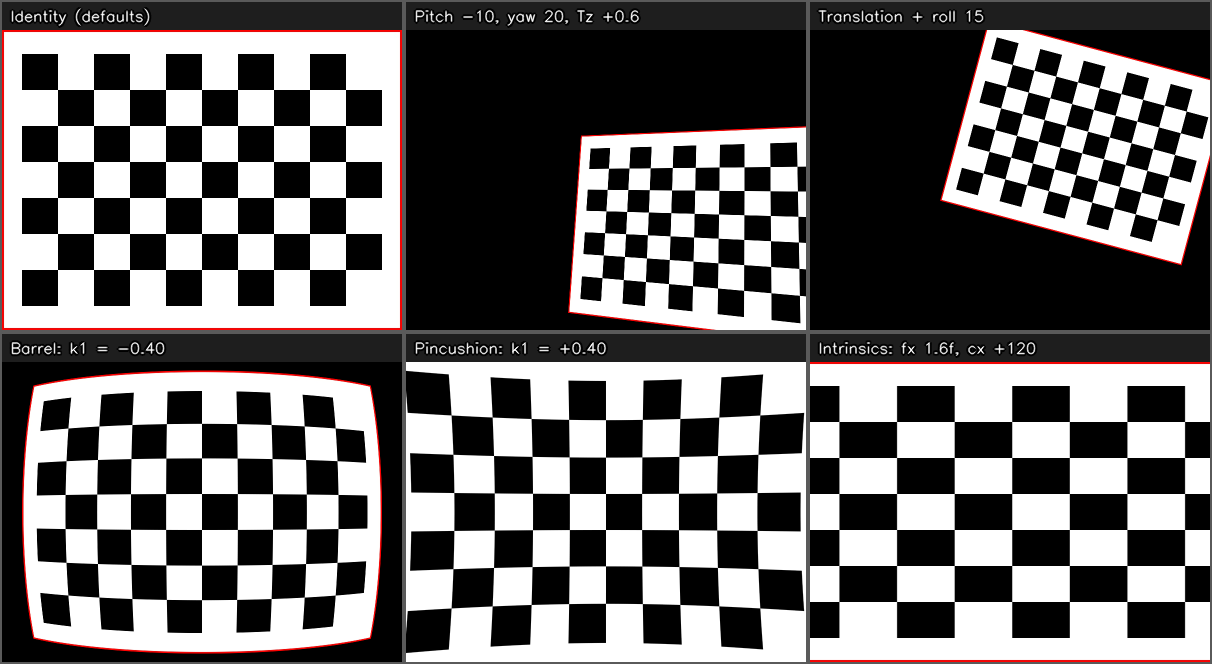
Outputs of the lab for the same chessboard: default camera, pose change, translation + roll, barrel and pincushion distortion, and an intrinsics change.
What is the Interactive Camera Calibration Lab?
The lab treats an input image as a flat object placed in 3D space. A virtual pinhole camera looks at it, and you control that camera with sliders: position, orientation, focal length, optical center and lens distortion. Every movement re-renders the result immediately.
There are 13 live parameters: translation (Tx, Ty, Tz), rotation as pitch, yaw and roll, the intrinsics fx, fy, cx, cy, and the radial distortion coefficients k1, k2, k3. With every slider at its starting position the output is identical to the input, so any change you see is caused by the one parameter you just moved.
The full source is a single Python file with two dependencies, numpy and opencv-python, and it is available on GitHub.
Run it in five minutes
git clone https://github.com/sibiliatommaso/camera-calibration-lab.git
cd camera-calibration-lab

python -m venv .venv
source .venv/bin/activate        # Windows: .venv\Scripts\activate

pip install -r requirements.txt
python camera_calibration_lab.py
Two windows open: Camera Lab - Output with the image and Camera Lab - Controls with the sliders. By default the script loads a sample chessboard from the repository. To use your own picture, pass its path:
python camera_calibration_lab.py path/to/your_image.jpg
Keys, with the image window focused: r resets all sliders, s saves the output and prints K, R, T and distCoeffs, h toggles the parameter overlay, and q or ESC quits.
Note: install
opencv-python, notopencv-python-headless. The headless build has no GUI support, so it cannot open windows or trackbars.
The pinhole camera model in 60 seconds
A pinhole camera is described by two groups of parameters. The extrinsics (R and T) say where the scene is relative to the camera. The intrinsics (K) say how the camera turns 3D points into pixels.
In the lab, the image lies on the plane with , and the world frame has its origin at the camera center. A world point is expressed in the camera frame as:
The intrinsic matrix collects the focal lengths in pixels and the optical center:
| Group | Sliders | What it changes |
|---|---|---|
| Translation | Tx, Ty, Tz |
Position of the plane relative to the camera. The plane depth becomes 1 + Tz. |
| Rotation | Pitch X, Yaw Y, Roll Z |
Orientation of the plane, in degrees. |
| Intrinsics | fx, fy, cx, cy |
Zoom and optical center, in pixels. |
| Distortion | k1, k2, k3 |
Radial lens distortion. |
From sliders to pixels: the five-step pipeline
Every time a slider moves, the lab runs the same five steps:
- Build the intrinsic matrix
Kfromfx,fy,cx,cy. - Build the rotation matrix
Rfrom the three Euler angles. - Build the plane-to-image homography
HfromK,RandT. - Warp the image with
cv2.warpPerspectiveto get the ideal, undistorted pinhole image. - Apply radial distortion with a meshgrid and
cv2.remap.
Step 2: from Euler angles to a rotation matrix
Each elementary rotation is built from a Rodrigues vector (axis * angle) with cv2.Rodrigues, then the three are composed:
def euler_to_rotation(pitch_deg, yaw_deg, roll_deg):
    def axis_rot(axis, deg):
        rvec = np.zeros(3, dtype=np.float64)
        rvec[axis] = np.radians(deg)      # Rodrigues vector = axis * angle
        R, _ = cv2.Rodrigues(rvec)
        return R

    Rx = axis_rot(0, pitch_deg)
    Ry = axis_rot(1, yaw_deg)
    Rz = axis_rot(2, roll_deg)
    return Rz @ Ry @ Rx
Step 3: the plane-to-image homography
A point on the plane is , so in the camera frame it becomes:
where are the columns of . Projecting with gives the homography from plane coordinates to output pixels. The source pixels are first mapped onto the plane by a matrix , which centers the image on the optical axis and scales it by the reference focal length . The matrix passed to cv2.warpPerspective is:
def build_homography(K, R, T, w, h, f0):
    s = Z_PLANE / f0
    M = np.array([[s, 0.0, -s * w / 2.0],
                  [0.0, s, -s * h / 2.0],
                  [0.0, 0.0, 1.0]], dtype=np.float64)
    P = np.column_stack((R[:, 0], R[:, 1], Z_PLANE * R[:, 2] + T.reshape(3)))
    return K @ P @ M
Two sanity checks are worth remembering:
- With the default values (
R = I,T = 0,f = f0, optical center in the middle of the image)His the identity, which is why the output starts equal to the input. - With
T = 0, the homography reduces to the classic pure rotation case, where is the default intrinsic matrix:
Step 5: radial distortion, and why it has to be inverted
The OpenCV radial model maps ideal normalized coordinates to distorted ones:
There is a catch. cv2.remap is a backward mapping: for every destination pixel, which is distorted, it needs the source position, which is undistorted. That means inverting the polynomial, and it has no closed form. The lab uses a fixed-point iteration, the same idea behind cv2.undistortPoints:
xd = (grid_u - cx) / fx
yd = (grid_v - cy) / fy
xu, yu = xd.copy(), yd.copy()

for _ in range(DIST_ITERS):          # 8 iterations
    r2 = xu * xu + yu * yu
    factor = 1.0 + k1 * r2 + k2 * r2 ** 2 + k3 * r2 ** 3
    factor = np.clip(np.nan_to_num(factor, nan=1.0, posinf=50.0, neginf=0.05), 0.05, 50.0)
    xu = xd / factor
    yu = yd / factor
The np.clip line keeps the factor positive and bounded, so extreme coefficients can never produce NaN, inf or a division by zero. Normalization uses the same K, so the coefficients have the same meaning as the ones returned by cv2.calibrateCamera.
Five experiments to build intuition
1. Zooming is not the same as moving closer
For a frontal plane the projection is:
so what matters is the ratio . With Tx = Ty = 0, double fx and fy and double the plane depth 1 + Tz as well (set Tz to 1): the image does not change. Now tilt the plane with Yaw and repeat the comparison. The foreshortening is no longer the same, which is exactly why focal length and distance are not interchangeable. It also explains why a metric measurement from a single camera needs both: pixel displacement alone does not tell you speed, as in the optical-flow approach of rover slip estimation on lunar sand.
2. The optical center is not a translation
Move cx and cy. The image shifts, but with no change in perspective. Compare it with Tx and Ty, which move the plane in front of the camera and change what the camera sees.
3. Barrel versus pincushion
Sweep k1 from negative to positive and watch how the straight chessboard lines bend. In the OpenCV model, k1 < 0 gives barrel distortion and k1 > 0 gives pincushion distortion.
4. Rotation versus translation
Compare Yaw with Tx. A pure rotation about the camera center has no parallax: it is exactly the homography from above, with T = 0. A translation does change parallax. Note that with the plane at depth 1 and f = f0, even a 30° rotation moves the plane far off screen. That is physically correct: add some Tz or reduce f to keep it in view.
5. Reproduce a real calibration
Take the result of your own cv2.calibrateCamera run and read the parameters out:
ret, K, dist, rvecs, tvecs = cv2.calibrateCamera(
    obj_points, img_points, gray.shape[::-1], None, None)

fx, fy, cx, cy = K[0, 0], K[1, 1], K[0, 2], K[1, 2]
k1, k2, p1, p2, k3 = dist.ravel()[:5]
Then set the sliders to those values. The lab loads images downscaled to at most 900 px on the longest side, so if your calibration image was larger, scale fx, fy, cx and cy by the same factor first. The lab models radial distortion only, so p1 and p2 (tangential distortion) are exported as zero.
Common problems
cv2.error: The function is not implemented ... Rebuild the library with Windows, GTK+ 2.x or Cocoa support. You installedopencv-python-headless. Runpip uninstall opencv-python-headless, thenpip install opencv-python.- The window does not open on a remote server, WSL or Docker. The app needs a display: use a local desktop session, X forwarding or WSLg.
Cannot read 'img/scacchiera.jpg'. Run the script from the repository root, or pass the image path explicitly.- Black image with
INVALID POSE. The plane is behind the camera or edge-on. Reduce the rotation or increaseTz. - Qt or Wayland errors on Linux. Try
QT_QPA_PLATFORM=xcb python camera_calibration_lab.py.
Limitations
- Pinhole model with radial distortion only: no skew and no tangential distortion.
- The whole plane must be in front of the camera. If any image corner crosses the camera plane, the pose is flagged as invalid instead of showing a partial render.
- With large
kvalues the radial polynomial is not monotonic, so the fixed-point inversion may not converge everywhere. The output stays finite and safe, but it is no longer geometrically exact in those regions.
Frequently asked questions
What does the intrinsic matrix K contain?
The focal lengths fx and fy in pixels and the optical center cx, cy. In this lab skew is zero, so the matrix has exactly those four free parameters.
Is a longer focal length the same as getting closer to the object?
Only for a frontal plane. The image depends on in that case, but as soon as the plane is tilted the perspective differs, so the two are not interchangeable.
How can I tell barrel from pincushion distortion?
Check the sign of k1 in the OpenCV model: negative values give barrel distortion, positive values give pincushion distortion.
Get the code
The lab is open source under the MIT license. Download it, break it and tell me what you would like to see in the next lab: camera-calibration-lab on GitHub.